EBCC Mumbai logo EBCC Mumbai Continue to old website
EBCC Mumbai crest
A new chapter for our church family

Welcome home. Our new church app is here.

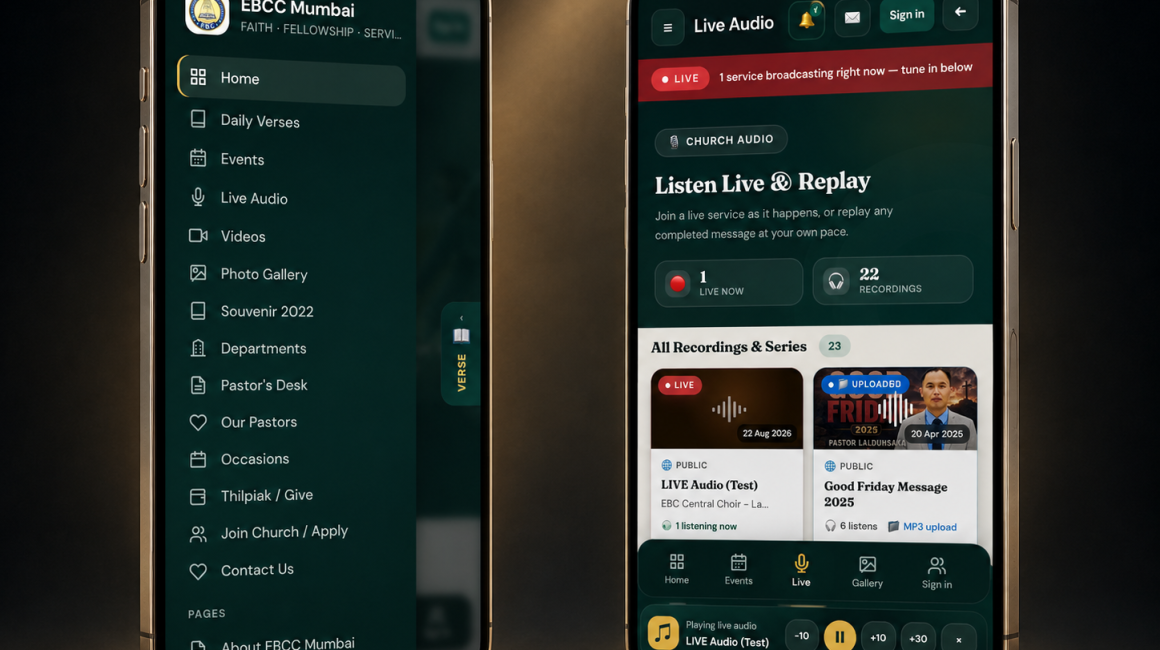
One place to worship with us wherever you are — live service audio, the sermon archive, photos, events, pastor's updates and the daily verse, all kept close to home on your phone or computer.

“Let us consider how we may spur one another on toward love and good deeds.” — Hebrews 10:24

EBCC Mumbai Our new app is live — tap to install and stay connected 🎉
EBCC Mumbai

Looks and feels like a real app — no app store needed

Works on iPhone, iPad, Android & computers No app store, no download size One tap from your home screen Always the latest version

“For where two or three gather in my name, there am I with them.”

Matthew 18:20

Where would you like to go?

Two doors, one church family

The new app is where we're building everything going forward — a home for worship that travels with you. The classic website is still open if you'd rather stay a little longer.

New · Recommended

The new EBCC Mumbai app

Live service audio, the full sermon archive, photo galleries, events, pastor's desk updates and the daily verse — kept current by the church office every week.

📲 Open the new app
Classic site

Our old website

Still online for now, including our full church history and about pages. It isn't being actively updated anymore, so some information may be out of date.

Continue to old website →
Takes under a minute

Install it on your device

Pick your device below for exact steps. Installing adds an EBCC Mumbai icon to your home screen or desktop — nothing to download from an app store.

Install on Android

Using Chrome, Edge, Brave or Samsung Internet

Open the app →
  1. Open connect.ebccmumbai.com in Chrome using the button above.

  2. An “Install app” banner may appear right away — tap it. If not, tap the ⋮ menu in the top right corner.

  3. Choose “Install app” or “Add to Home screen” from the menu.

  4. Confirm by tapping Install. The EBCC Mumbai icon will appear on your home screen.

Tip: once installed, the app opens full-screen — no browser bar — just like any other app on your phone.

Install on iPhone

Must be done using the Safari browser

Open the app →
  1. Open connect.ebccmumbai.com in Safari (not Chrome — Apple requires Safari for this step).

  2. Tap the Share icon ⬆️ at the bottom of the screen (or top, on some iPhones).

  3. Scroll down and tap “Add to Home Screen.”

  4. Tap “Add” in the top right corner. The EBCC Mumbai icon now appears on your home screen.

Don't see “Add to Home Screen”? Make sure you're using Safari, not another browser app.

Install on iPad

Same steps as iPhone, using Safari

Open the app →
  1. Open connect.ebccmumbai.com in Safari on your iPad.

  2. Tap the Share icon ⬆️ in the top right of the toolbar.

  3. Choose “Add to Home Screen” from the list of options.

  4. Tap “Add.” The app icon will sit on your iPad home screen alongside your other apps.

Once added, you can drag it into a folder or your dock like any other iPad app.

Install on Windows or Mac

Using Chrome, Edge or Brave

Open the app →
  1. Open connect.ebccmumbai.com in Chrome or Edge on your computer, using the button above.

  2. Look for an install icon ⊕ in the address bar, or tap the ⋮ menu at the top right.

  3. Select “Install EBCC Mumbai” (or “Apps → Install this site as an app”).

  4. Click Install. The app opens in its own window and adds a shortcut to your desktop and Start Menu / Applications folder.

On Safari for Mac, use File → Add to Dock instead.
EBCC Mumbai logo EBCC Mumbai Evangelical Baptist Convention Church
Who we are

A church family, shepherded far from home

EBCC Mumbai began as a way to care for Evangelical Baptist Convention members who had come to the city for study and work, far from their home churches. It was formally inaugurated in March 2015, and its first regular worship service that July began a gathering that has continued every Sunday since.

Today the congregation meets for weekly worship and Sunday school, with an additional monthly service, and is shepherded by a local committee alongside its Missions, Women's, Youth and Children's departments — each carrying its own ministry through the year.

Read our full story on the old website →
Good to know

Common questions

Do I need to visit an app store?

No. This is a Progressive Web App (PWA) — installing it just adds an icon to your home screen or desktop straight from your browser. There's nothing to download from the Play Store or App Store.

Will the old website stop working?

Not right away. It will remain online so nothing you rely on disappears overnight, but it is no longer being actively updated. Announcements, events, and audio will only be kept current on the new app going forward.

Does installing cost anything or use much storage?

No. It's free, and because it's a web app rather than a traditional download, it takes up only a small amount of space on your device.

I don't see an install option on my browser.

Make sure you're using a supported browser — Chrome, Edge or Brave on Android, Windows and Mac, or Safari on iPhone and iPad. You can always keep using the site normally in your browser even without installing it.